

Why Does Video Creation Have to Be So Hard?
How much time does it take to create a single YouTube video?
Writing a script, finding the right background footage, recording voiceover, adding subtitles, and editing. A 5-minute video easily takes half a day. You've probably experienced this before.
We faced the same challenge. We had great ideas, but turning them into videos was too cumbersome. That's why we built VMAI.
What is VMAI?
VMAI (VoiceToAI) is an AI-powered automatic video generation platform.
The core concept is simple: You provide the idea. AI handles the rest.
Enter a simple sentence, and:
- AI writes a professional script
- Generates natural-sounding voiceover
- Automatically selects matching background videos and images
- Creates a finished video with subtitles and transitions
Generate your first video in under 3 minutes.
Four Input Modes for Every Situation
Not everyone starts from the same place. That's why VMAI offers four input modes.
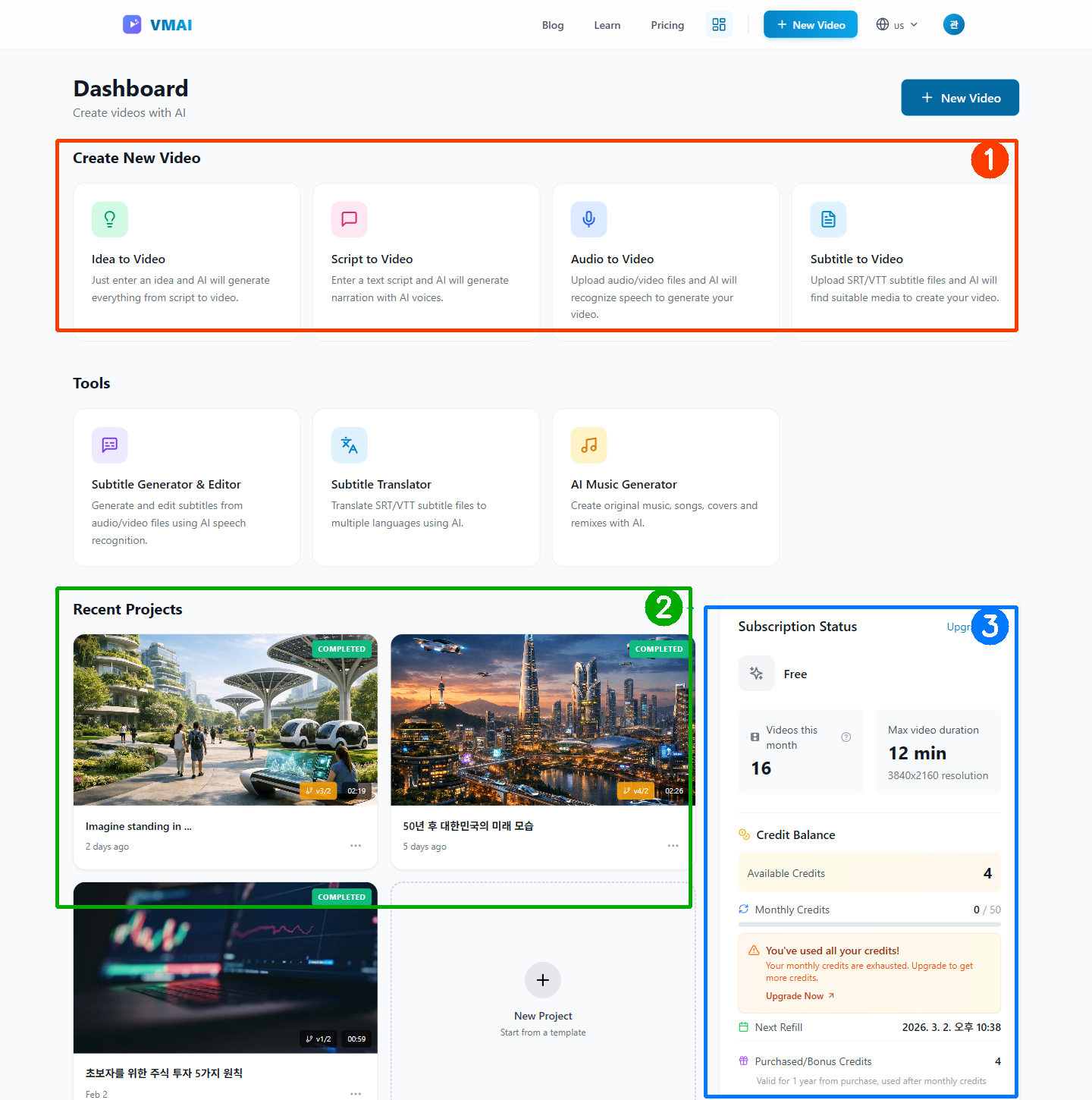
1. Idea Mode 💡
"I want to make a video, but I don't know what to write"
The simplest approach. Just enter a one-line idea.
"Example: "5 principles of stock investing for beginners"
AI automatically generates a structured script based on your idea. The AI creates video-optimized content, and you can edit any part you don't like.
2. Script Mode ✍️
"I already have a script. Just make the video"
Already have a blog post, lecture notes, or presentation script? Simply paste your text. VMAI transforms it into a complete video with natural voiceover and visuals.
3. Audio Mode 🎙️
"I have a recorded audio file"
Upload your podcast, interview, or lecture recording. AI accurately transcribes the speech, generates subtitles, and automatically matches visuals to the content.
Supports various audio formats including MP3, WAV, M4A, OGG, FLAC, and AAC.
4. Subtitle Mode 📝
"I already have an SRT subtitle file"
Use professionally translated subtitles or existing SRT/VTT files from your projects. Create perfectly timed videos quickly.
AI Handles Everything
Here's the core technology behind VMAI.
🔊 10 Natural AI Voices
Generate human-like voices with the Supertonic-2 TTS engine. Choose from 5 male and 5 female voices to match your content's mood. Supports 5 languages including English and Korean.
🖼️ Smart Media Selection
Automatically searches millions of images and videos from Pixabay and Pexels. But that's not all.
Vision AI verifies whether the searched media actually fits your content. Searched for "coffee shop" but got irrelevant images? AI automatically re-searches to find better matches.
🎨 AI Image Generation
Can't find the right image from stock media? Use AI Image Generation to create the perfect scene. AI generates images that perfectly match your content, so you never have to compromise with unfitting stock images.
"🚀 Coming Soon: AI video generation is also in the works. Soon you'll be able to generate not just images, but videos with AI!
🎬 Professional-Level Video Editing
- 11 transition effects: Crossfade, Slide, Push, and more
- Ken Burns effect: Adds natural motion to still images
- Responsive subtitles: Auto-adjusted for screen size
- 4K resolution: Up to 4K support (Pro plan and above)
⚡ Real-Time Progress Tracking
Wondering when your video will be ready? Check the status in real-time. Monitor progress for each stage—voice generation, media search, encoding—at a glance.
Media Review: Create Perfect Videos with AI
One of VMAI's standout features is the Media Review System.
Review and modify all images and videos selected by AI before final rendering:
- Preview AI-selected media for each scene
- See Vision AI's reasoning (why this image was chosen)
- Request re-search if unsatisfied
- Upload your own preferred images
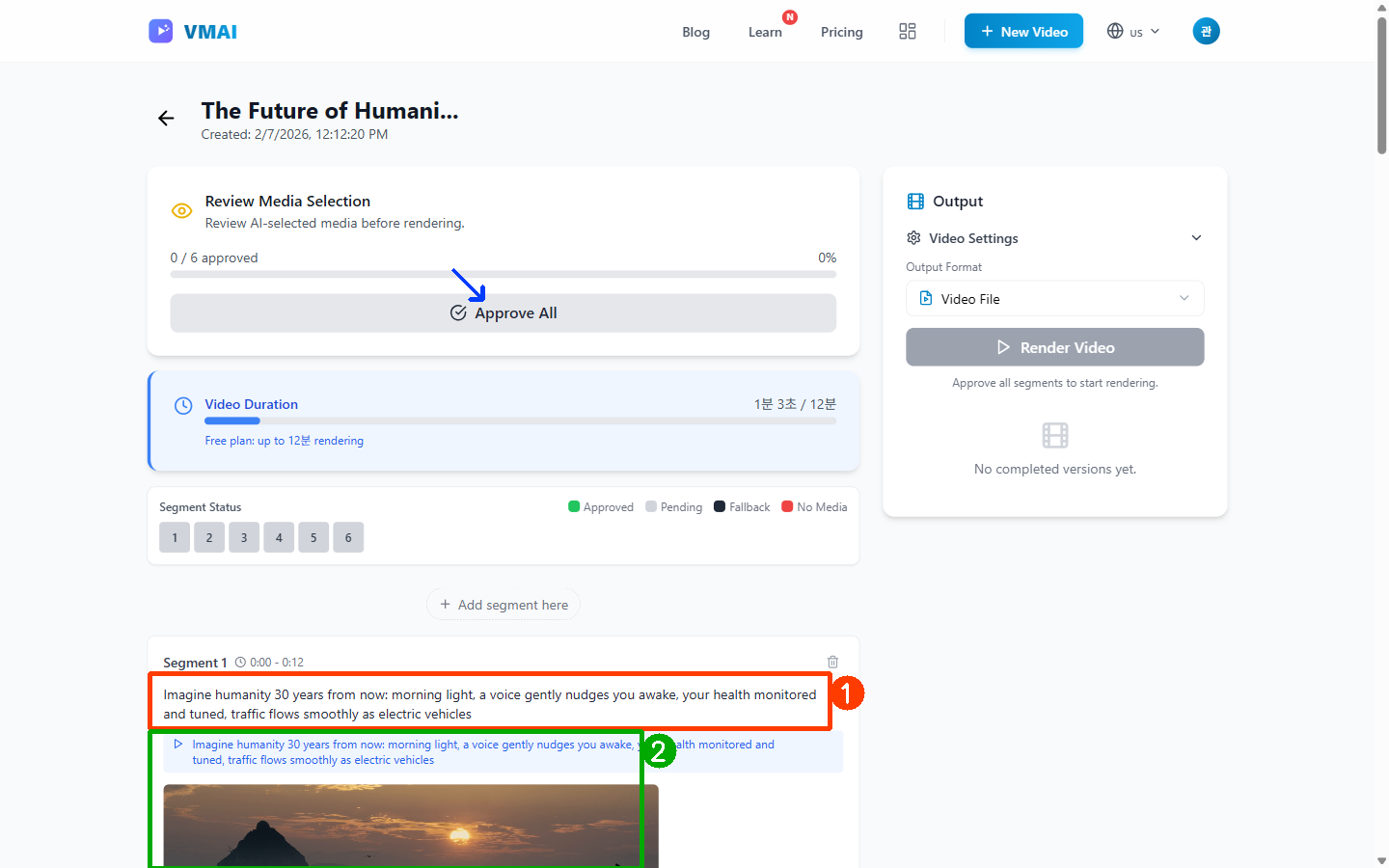
It's the optimal workflow combining AI efficiency with human creative judgment.
Start for Free
VMAI offers a completely free plan.
| What You Can Do with Free Plan |
|---|
| Generate 4 videos per month |
| Up to 3 minutes length |
| 720p HD resolution |
| 10 TTS voices |
| 7-day result storage |
Start right now without a credit card. Create your first video and experience VMAI for yourself.
Need longer videos, higher resolution, or GPU rendering? Check out our paid plans.
See You on the VMAI Blog
This blog will regularly share the following content:
📢 Product Updates
New feature releases, performance improvements, UI changes—we'll transparently share VMAI's development journey.
💡 How-To Guides
- YouTube Shorts creation tips
- Educational content production know-how
- Marketing video strategies
- TTS voice selection guide
🎯 User Stories
Real examples of what users are creating with VMAI and the results they're achieving.
🔬 AI Technology Insights
Technical discussions on video generation AI advancement, how Whisper speech recognition works, Vision AI mechanics, and more.
Create Your First Video Now
Hands-on experience beats lengthy explanations.
Go to Dashboard → Enter your idea → Check your video in 3 minutes
"📚 Feeling a bit lost? Follow our Getting Started Guide with step-by-step screenshots.
Have questions? Leave a comment below. All feedback helps us make VMAI a better service.
Welcome to the new era of video creation. 🎬
The VMAI Team
Enjoyed this article?
Subscribe to get notified when we publish new posts. No spam, unsubscribe anytime.
Comments
Please login to leave a comment
LoginNo comments yet. Be the first to comment!